
Automatic expense tracking from bank texts and Apple Pay

Pockito reads the purchase texts your bank already sends and the Apple Pay or payment alerts on your phone, and files each one as an expense with a category and an account. No bank login. Set it up once.

  • Shortcuts, set up once
  • Allow it once, in Android settings

Bank SMS and Apple Pay tracking

Your spending logs itself.

When your bank texts you about a purchase, Pockito reads the message and files the expense. Apple Pay taps and payment alerts land the same way, with a category and the right account.

It learns from you.

Every capture is decided in the same order: your rules first, then what it learned, and when it isn't sure, it asks.

Reads your bank's messages in United States

Pockito already knows 54 banks and wallets in 14 countries, and its AI reads any other bank's messages too. Supported banks

Set up once, in a few minutes. The videos below show how, on iPhone and on Android.

Set it up once.

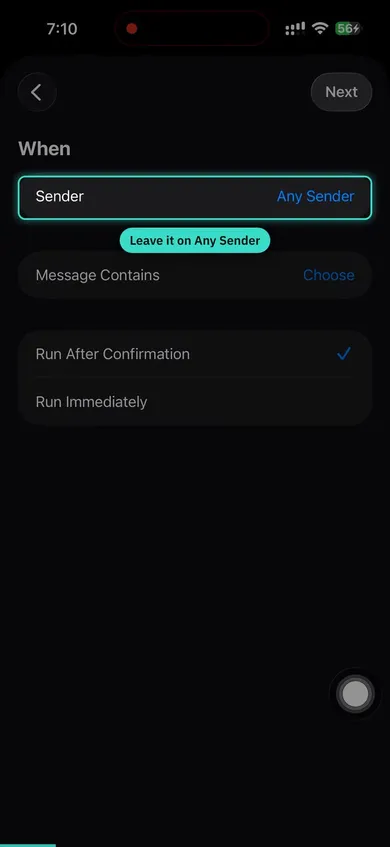
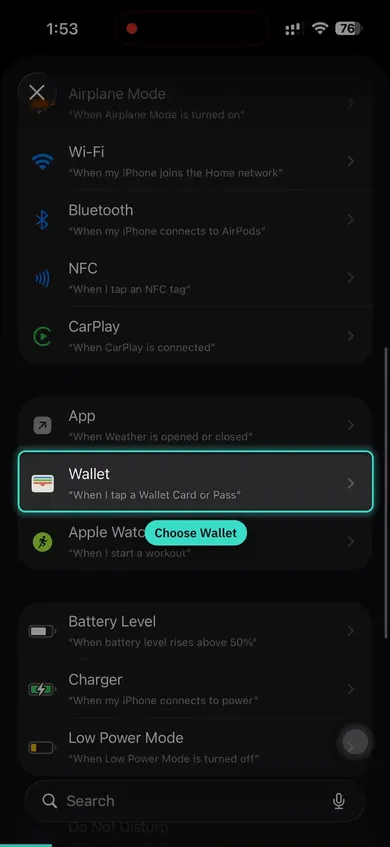
A few minutes, once. On iPhone it is one Shortcuts automation for bank texts and one for Apple Pay. On Android you allow it in Settings and tick your banks.

  • Watch it, then set it up beside the video. 3:17 for bank texts, 3:35 for Apple Pay.
  • English narration, with captions in all 24 languages.
  • Only the senders you pick are read. Codes and conversations never are.
Step-by-step guide, with tips
Bank SMS Setup Read your bank's transaction messages 3:17

Free and Pro

Free

  • Automatic tracking to try it, each period
  • Every manual entry and your full history

Pro

  • Automatic tracking without limits
  • Rules for bank messages

The App Store and Google Play show Pro's price in your currency.

Questions, answered.

Every answer here is also in the Guide, with the steps.

Which banks can it read?

Formats for 54 banks and wallets in 14 countries are built in, among them CIB, National Bank of Egypt, Al Rajhi, Emirates NBD, HDFC Bank, Chase and Bank of America. Its AI reads messages from other banks too.

How does Apple Pay tracking work?

You set up one Shortcuts automation, once. After that, each Apple Pay purchase shows up in Pockito a moment after you tap.

Does it work on Android?

Yes. Pockito reads your bank SMS once you allow it, and the payment alerts from the apps you choose.

How do I get Auto-Track to catch more?

Leave it on Any Sender so one setup covers every bank you use. Add keywords in the language your bank writes in, and keep away from words that also appear in verification codes. In an account's details, pick its bank: its messages then land in that account even when they print no card number.

Keep reading

On this page

Back to top