





AI expense tracker Know what's safe to spend.

Pockito logs your spending from bank texts, Apple Pay and payment alerts, and shows what's safe to spend today, after bills and savings. No bank login.

Free to download on iPhone and Android, in 24 languages.

  • No bank login
  • Data never sold
  • Face ID lock
Tap to try:

Today, Wed 7 Oct · 19 days left

$130 a day. Yours to spend.

Reviews and messages

  • I saved my money Ranjithkumar Ramakrishnan · India
  • New update mokhselim · United States
  • Track money AFareedk · Egypt
  • AI powered Vivantro · Egypt
  • The best app to track expenses Mahmoud_Abdelmaaboud · United Arab Emirates
  • Finally, an Expense App That Saves Time Boba-hasseb · Egypt
  • Best app ever Jonh adams 123 · Poland
  • Professional app Kareem Ibrahim222 · United Arab Emirates
  • Smooth Mostafa3la2 · Egypt
  • The best expenses app I used ever TawfiqAtDev · Egypt
  • Excellent feedback adel aref ibrahim · Egypt
  • افضل تطبيق علي الاطلاق لمتابعة فلوسك يوسف عوف · Egypt
  • WhatsApp مساء الخير يا بشمهندس. انا بستخدم البرنامج بتاع حضرتك Pockito وأولاً ما شاء الله مجهود مقدر البرنامج كخدمات وخواص ممتاز. Egypt
  • التطبيق ممتاز Abdullah47Dos · United Arab Emirates

Picked from App Store reviews and WhatsApp messages, word for word.

Bank SMS and Apple Pay tracking

Your spending logs itself.

When your bank texts you about a purchase, Pockito reads the message and files the expense. Apple Pay taps and payment alerts land the same way, with a category and the right account.

It learns from you.

Every capture is decided in the same order: your rules first, then what it learned, and when it isn't sure, it asks.

Reads your bank's messages in United States

Pockito already knows 54 banks and wallets in 14 countries, and its AI reads any other bank's messages too. Supported banks

Set up once, in a few minutes. The videos below show how, on iPhone and on Android.

Set it up once.

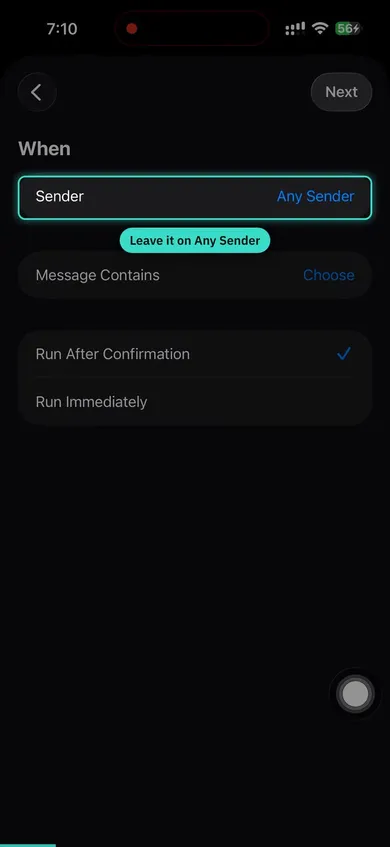
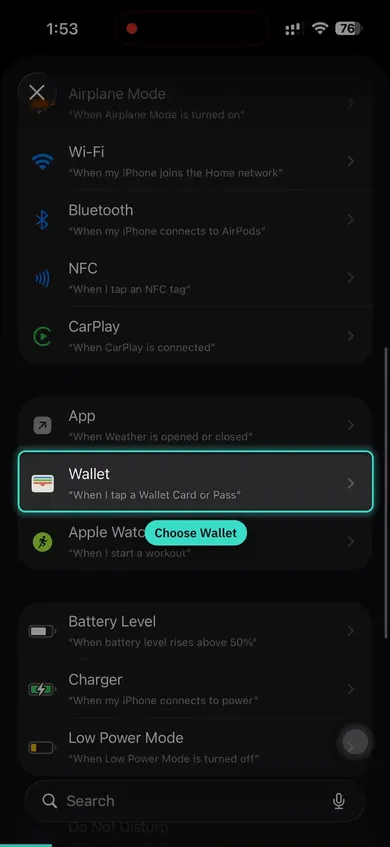
A few minutes, once. On iPhone it is one Shortcuts automation for bank texts and one for Apple Pay. On Android you allow it in Settings and tick your banks.

  • Watch it, then set it up beside the video. 3:17 for bank texts, 3:35 for Apple Pay.
  • English narration, with captions in all 24 languages.
  • Only the senders you pick are read. Codes and conversations never are.
Step-by-step guide, with tips
Bank SMS Setup Read your bank's transaction messages 3:17

For the rest, say it or snap it.

Cash, a receipt from a shop that never texts you, a bill you paid at the counter. Two taps from the bar at the bottom of Home.

Voice expense tracker

Just say it.Pockito logs it.

Tap the mic and say it the way you'd tell a friend. Pockito writes as you talk, and you can fix any part in place.

Receipt scanner

Scan anything.Every line sorted.

Hold the camera over a receipt and every line becomes an item. Screenshots, PDFs and pasted bank messages work too.

Every way in, every kind of paper.

Scan opens on four sources. Whichever you pick, the same reader fills in the amount, the merchant, the date and the account, and you check it before it saves.

  • Tap one. Pockito reads it. Newest first · the date comes from the picture
  • Snaps by itself when it's steady Or tap the shutter any time
  • Pick a photo or a PDF Receipts and invoices from Files
  • Copied a bank text? Paste it here No retyping
  • Share it to Pockito From Photos, Files, Mail or a chat, without opening the app first

It reads

  • Receipt
  • Paper receipt
  • Bill
  • Transfer receipt
  • Bank text
  • Wallet screen
  • ATM slip
  • Payslip
  • Refund slip
  • Handwritten note
  • Chat
  • Screenshot
  • File

And works out what it means

  • Gold, bought the grams join your gold in Wallet
  • Money circle, turn 3 of 10 your payout month stays in view
  • Laptop installment 4 of 12 the plan moves one payment forward
  • A refund for your Amazon purchase nets against the purchase, never income
  • Your salary slip offers to update the pay Home uses
  • Charged in EUR, priced in USD both amounts kept
  • Money you're told is coming waits until your bank confirms it
  • This transfer didn't go through nothing is logged
  • Already in Pockito no double entry
  • Read on this phone works offline, you check the values

Budget planner

See where your money goes.

Shopping is $13 over. Everything else is fine.

  • Give any category a limit in Insights and see what's left.
  • Insights warns you early: “On pace to finish $90 over budget”, unusual spending, a price that went up. Free shows the top alert, Pro shows them all.
  • $430 Groceries of $600
  • $371 Food & Dining of $450
  • $172 Transportation of $300
  • $160 Healthcare of $200
  • $73 Shopping of $60 Over

Insights is a board you arrange.

Pick from 30 cards, from top merchants and a spending map to subscription creep and a pace forecast, and drag them into the order you read them. Recaps for any week, month or dates are free for everyone.

Insights

It reads your month to you.

A briefing in plain words, alerts that catch drift before it becomes a problem, and the rhythm of your spending, day by day.

  • The briefing compares this period with the last and says why. Ask it a follow-up.
  • Alerts: unusual spending, a price that went up, on pace to finish over. Free shows the top alert, Pro shows them all.
  • A heatmap of when you spend, and trends against last period.

Subscription tracker

Stop paying for what you forgot.

Every renewal and free trial, caught before it charges you.

  • The Repeating tab keeps bills, subscriptions and the money you expect in one place.
  • Pockito reminds you before each one is due, flags a free trial about to end, and points out a subscription with no recorded spending for 60 days.
  • Add a warranty to a purchase and Pockito reminds you 30, 7 and 1 day before it ends.

You pick what reaches you, and when

  • Spending Warnings Alert Me At 80%
  • Upcoming Bills Heads-up Time · 3 days before
  • Weekly Recap Send On Sunday · Deliver At 09:00
  • Category Limits On
  • Warranty Expiry Alerts On
  • Quiet Hours 22:00 Until 08:00

AI money assistant

Ask Pockito. It gets done.

It does the work: it sets the limit, adds the bill, moves money between your accounts, and asks before it deletes anything. Type or say it, in your language.

Add transactions, adjust budgets, manage bills & savings

Try saying

Create Groceries, cap it at 600

Created Groceries with a $600 monthly limit.

Action applied

Net worth tracker

All your money. One number.

Bank, cash, savings, gold and cards, added up.

  • Wallet keeps cash, bank accounts, cards, mobile wallets and savings, each with its own balance.
  • Credit cards show their limit and due date. Installment plans show how many payments are left and the monthly amount.
  • A money circle (gam'eya) shows your turn and your payout month.
  • Add your gold by weight and karat. Net worth comes with Pro.

Try the gold screen with today's price

VALUE NOW USD 2,833 24 g · 21K · USD 118.04/g

Karat

Pick the karat stamped on the piece or printed on your receipt.

Follow the daily rate USD 118.04/gram · Today's rate, as of 10 Oct. Turn off to set your own price.

International price at the day's rate. Jewelers add workmanship, so a shop quote runs higher.

This is the gold screen in Pockito's Wallet

On this page

Back to top